Black Friday: 40% off the Perch licence for the first 500 orders until 1 Dec, $17.40 instead of $29, with code BLACKFRIDAY2026. The deal
Nine agents working. One is waiting on you.
Perch sits in your menu bar and keeps watch over every coding-agent session on your Mac, across all nine it supports — then taps you on the shoulder the moment one needs a decision. Approve it from the notification on your iPhone, with your Mac locked on the desk — or add Perch Pro to read the whole conversation and type your reply straight into the session.
- One-time $29
- Lifetime license
- iPhone app included
- macOS 13 or later
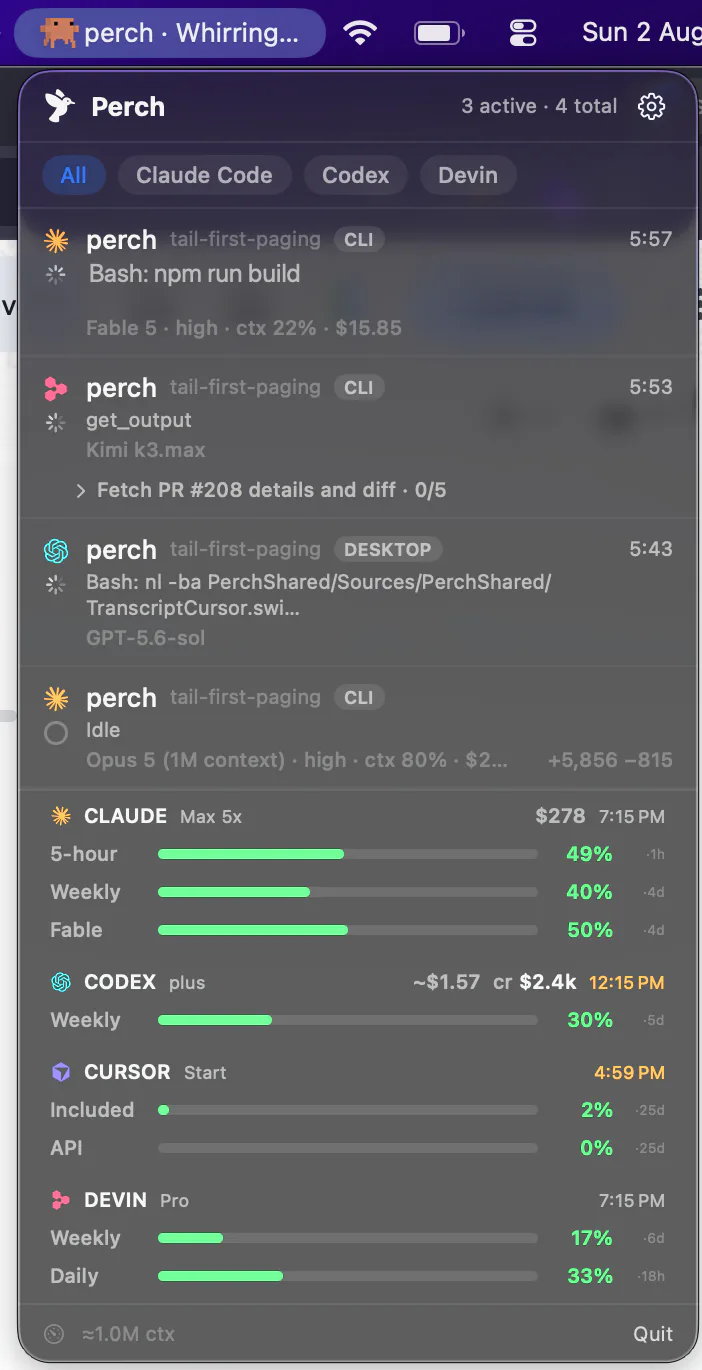
The actual app — live state, context & spend per session
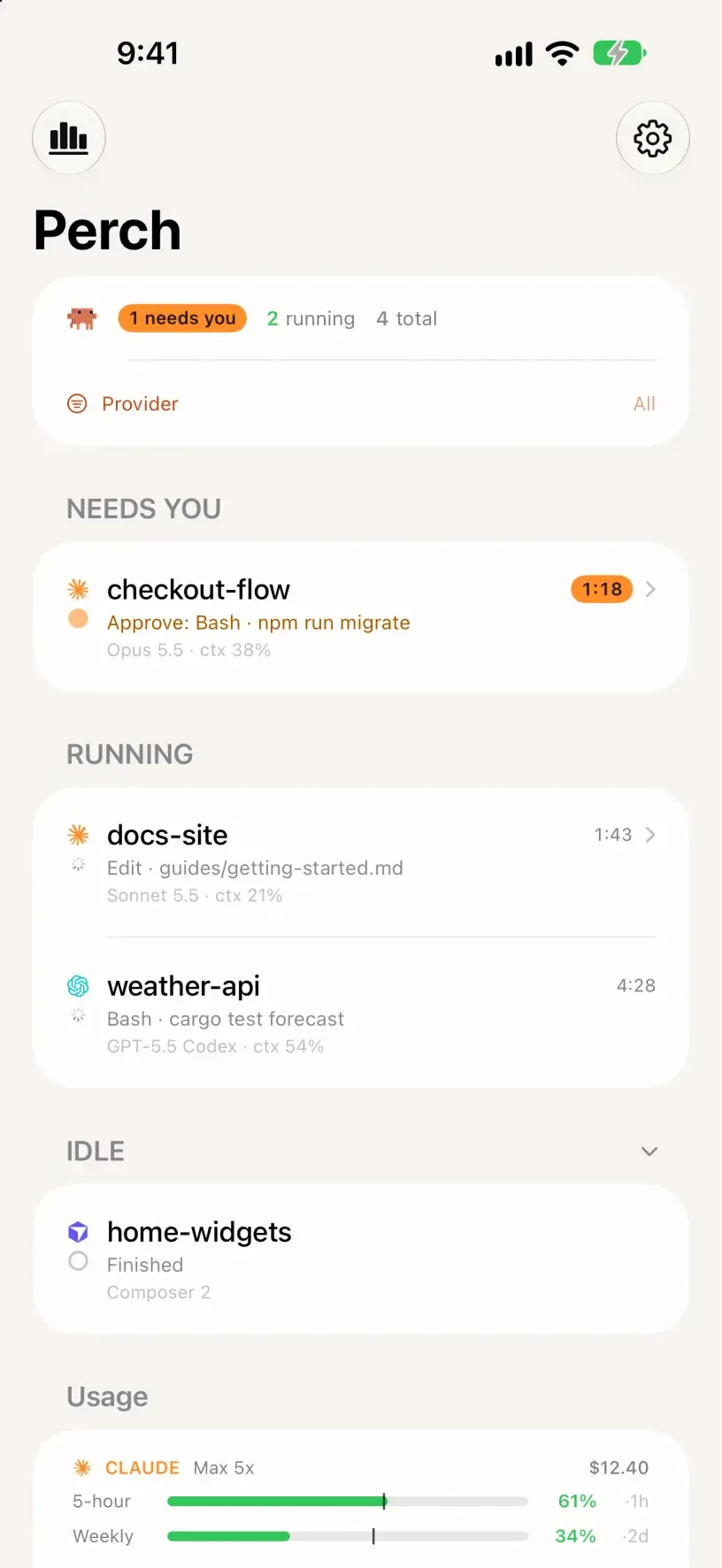

api-gateway needs approval
Bash · npm run db:migratePerch Companion — the iPhone app, included
Step away. Keep typing.
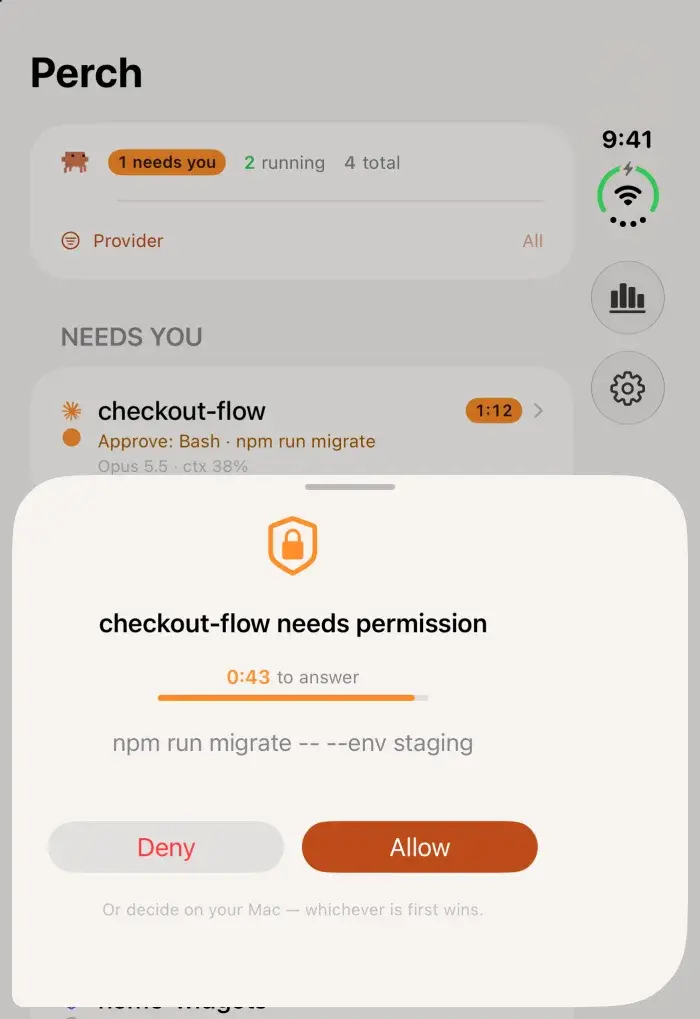
Every license includes Perch Companion, the iPhone app. Kick off a long refactor and go make coffee: your phone mirrors the whole fleet, raises a Live Activity while agents work, and pings you when one blocks. Allow and Deny are on the alert itself — Face ID, one tap, done — and a multiple-choice question is a tap through. With Perch Pro you can also read the whole conversation and type a new instruction into the session, then watch the turn pick up again.
- Perch – Agent Monitor
- Included with every license
- iOS 18 or later
Included
- Live fleet mirror — every session and state, in your pocket, with a clock on each one that’s waiting on you
- A Live Activity that starts itself the moment agents get to work — session rows, timers ticking live, task progress on your lock screen
- Allow and Deny on the permission alert — Allow asks for Face ID first, then the app connects and confirms on screen, or says plainly if the window closed
- Approvals arrive with a draining countdown, in the Dynamic Island too — one alert each, and a tap you can feel when one lands and when your Mac confirms the answer
- The whole command, every line, before you allow it — and no one-tap Allow on one too long for the lock screen to show
- “Allow and don’t ask again” when Claude Code suggests a rule — the same rule its terminal would save
- Answer Claude’s multiple-choice questions with a tap — off by default, in Settings → Notifications
- Answer on your Mac, and the “needs you” alert clears from your phone, even while it’s locked
- Claude Code’s background tasks, counted on its row on your phone and your watch
- A mark on Claude Code’s and Codex’s usage bars where even pace would be, so you can see when you’re ahead of your limit
- Made for iPhone Duo — unfold it, and the fleet and the session you pick sit side by side
- A warmer look taken from the app icon, in light or dark, and a fleet that keeps its order: tap anywhere on a row to open it, and quiet sections fold away
- Pairs over your LAN, or anywhere via your own Tailscale tailnet — end-to-end encrypted, with a step-by-step connection check when it won’t connect
With Perch Pro
- Type a full reply back into any agent’s own composer, and read the conversation for every one but OpenCode and Muse Code
- Conversations that scan: a run of tool calls folds into one line, like “Read 2 files and ran a command”, and Stop sits next to Send
- Tap a notification, and the conversation it’s about opens
- Stop a turn that’s going wrong: Claude Code, Codex, OpenCode, Antigravity, Droid, Amp and Muse Code. Devin’s interrupt key was measured and does something else; Cursor’s hasn’t been measured yet
- Your Mac stays locked the whole time — text arrives through tmux, herdr, Rex or the agent’s own server or plugin, and none of them needs the screen
Typing is a Perch Pro feature, and it has to be switched on in Settings separately — paying for Pro is not the same as consenting to remote input. It also needs the session running in tmux, herdr or Rex — Perch won’t type at a pane it can’t name, so a session in none of them gets no composer rather than a dead one. Droid needs tmux or Rex.
Codex, OpenCode and Amp are the exceptions: Perch talks to Codex’s and OpenCode’s own servers, and to Amp through its plugin, each of which addresses the session by id instead of whatever the screen happens to be showing. Codex needs nothing extra in its default mode, and neither does OpenCode 2; OpenCode 1 needs starting with --port, and Amp needs restarting once after Perch 0.5.139 installs its plugin.
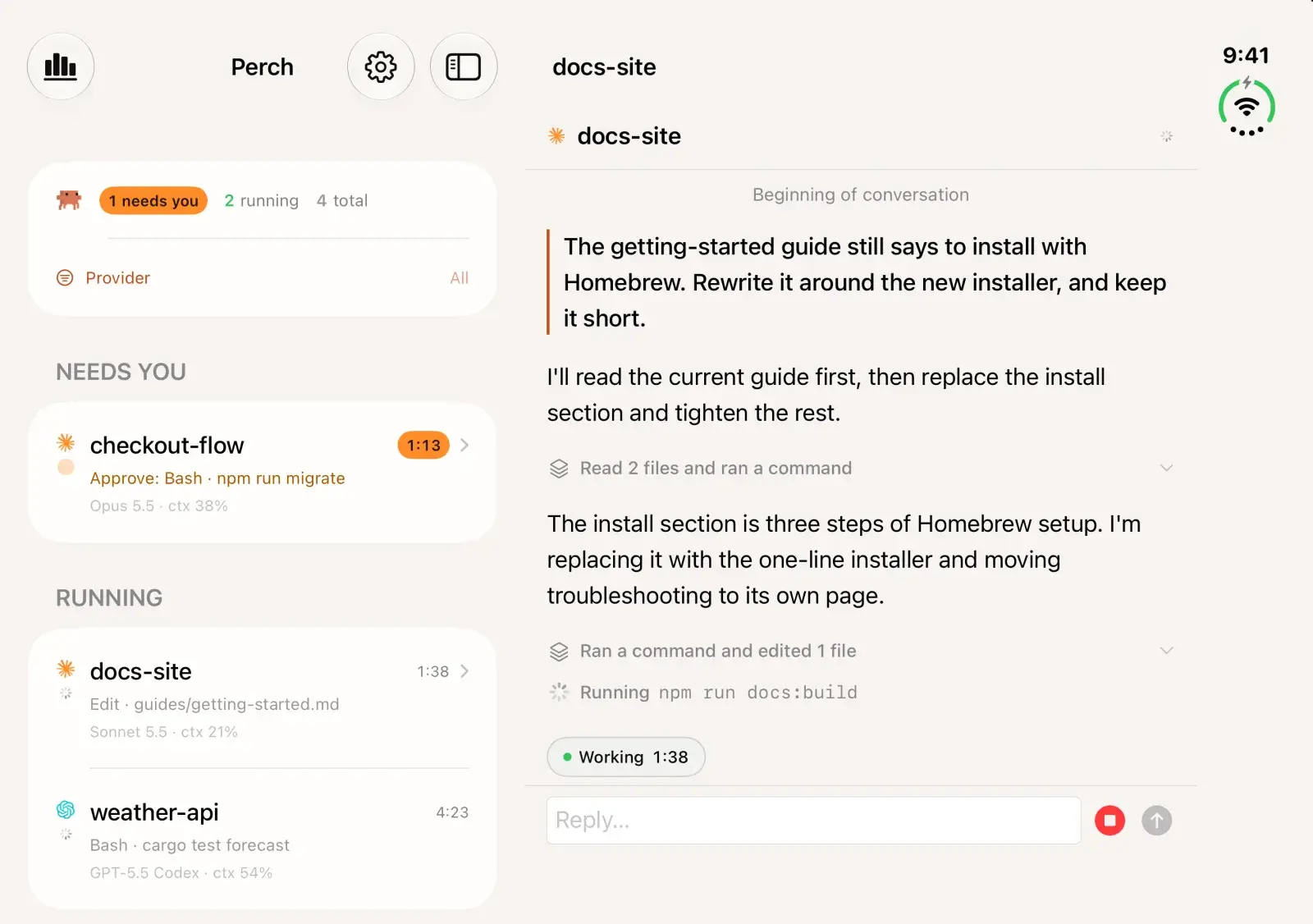
Perch Companion on iPhone Duo
Made for iPhone Duo.
Unfold it, and your sessions and a conversation sit side by side: the fleet keeps its own column, and the session you pick opens beside it, so you can read one agent while watching the rest. Lists keep to a readable width on the wide screen. Fold it, and the outer display works like any iPhone, approvals included.
Perch on Apple Watch
The fleet, on your wrist.
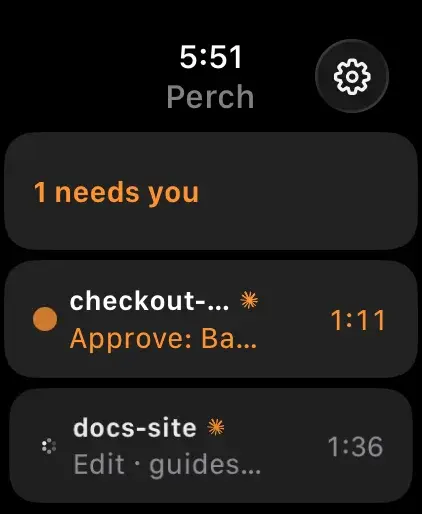
Raise your wrist to see how many agents are running, which sessions need you, and what each one is doing right now — no phone in hand. A Smart Stack widget surfaces the count before you even open the app.
- Included with every license
- watchOS 11 or later
Included
- Running count and live session states, glanceable in a second
- Approve or deny from your wrist — the whole loop, no phone in hand
- Answer an agent’s multiple-choice question with a chooser
- A tap on the wrist when a new session needs you
- Double Tap to confirm a decision you’ve already armed
- On the watch face: a gauge for your tightest usage window, and a live timer for how long the top session has waited
- Smart Stack widget puts the fleet — and your stats digest — in your watch face rotation
- Ask Siri “how many agents need me in Perch”
- Ships inside the iPhone app — nothing separate to find on the App Store — and pairs through your phone on the same encrypted link
With Perch Pro
- Dictate a reply to an agent
- Stop a turn that’s going wrong
- Each offered only where your Mac says it can land, the same rules as on the iPhone
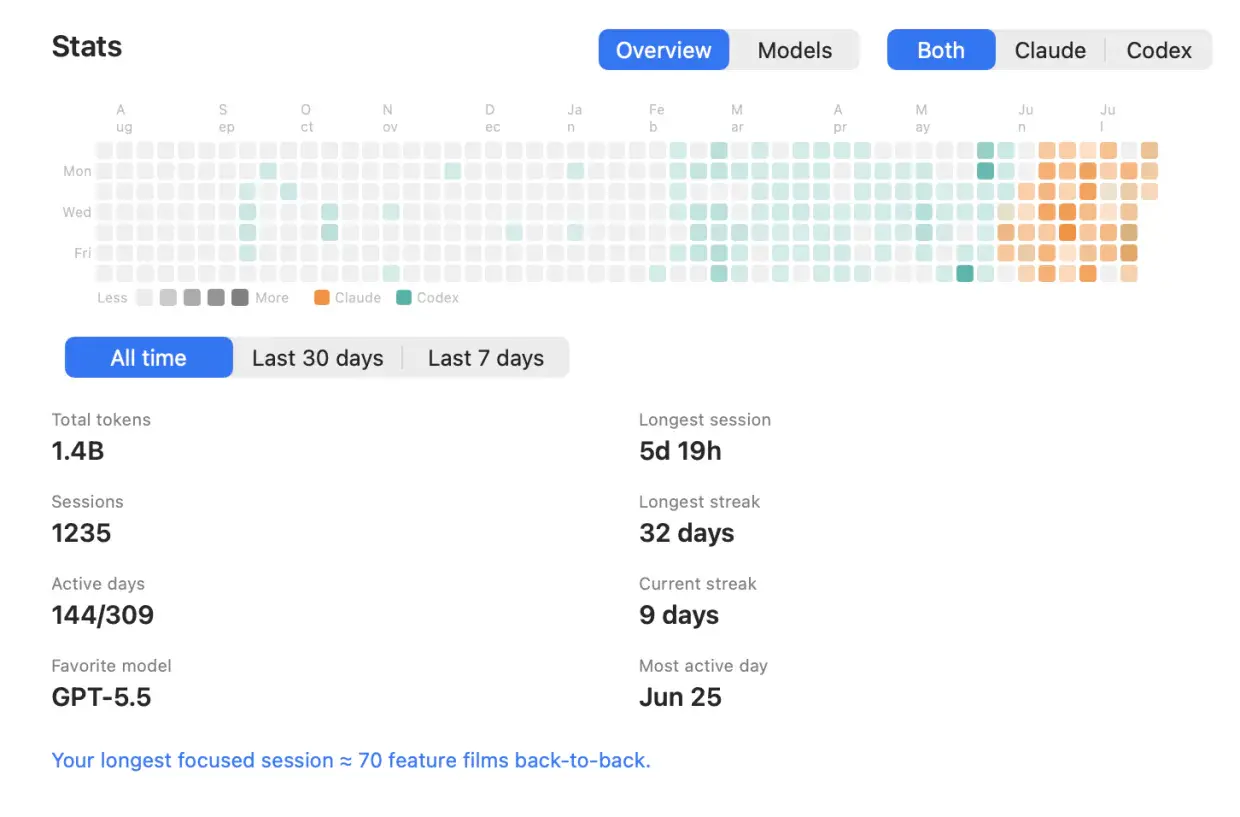
Stats — your year in agents
Every session you've ever run, counted.
Perch keeps a local history of every run and turns it into a dashboard: a contribution heatmap of your agent days, and an honest account of what you spend your tokens on. It reads your own files on your own Mac — nothing is uploaded to build it.
- A per-day heatmap, colored by the agent you ran that day
- Total tokens, sessions, and active days — all-time, 30 days, or 7
- Current and longest streak, so you can see the run you're on
- Longest session, most-active day, favorite model and the breakdown behind it
- Filter to one agent at a time — and read the digest on your phone and watch
Storage
See what your agents left on disk
Agents make worktrees and build folders faster than anyone deletes them. A pane in Settings lists both, across every repository your agents work in, with what each one costs you in space and what you would lose by removing it.
Every worktree, and what it holds
Including the ones you made by hand. Each shows its size, when it was last used, which agent made it, and what you’d lose: uncommitted files, commits on no branch, and commits that were never pushed.
Moved to the Trash, only when it’s safe
Perch won’t move a worktree that’s locked, open in a session or an editor, or holding work it can’t account for. Commits on no branch are saved to a perch/saved/ branch first, and you can put it back from the Trash until you empty it.
Build folders, listed and left alone
node_modules, Swift’s .build, Rust’s target, Xcode’s build folders and DerivedData, by size and by when the project was last used. Only folders git ignores make the list. Perch deletes none of them: Show in Finder, and the removing is yours.
Health
Know when it’s the service, not your setup
When an agent stalls, the fault can be on your Mac, in an out-of-date CLI, or on the vendor’s servers. Perch watches the last two for you, so an outage doesn’t cost you twenty minutes of debugging your own setup.
Outages, from the vendor’s own page
Perch reads the official status pages of Claude Code, Codex, Amp, Devin (Windsurf’s page) and Droid. When the part your agent uses is down, a red banner in the dropdown says so and links to the incident. A slowdown or maintenance shows as a small icon beside that agent’s usage, and every open problem is listed in Settings → General → Integrations. For Claude Code and Codex, the dropdown also notes when this Mac has seen three turns fail on server errors within five minutes, which can come before the vendor posts anything. Is Claude Code down?
Updates, with the command to run
Settings shows the version of Claude Code, Codex, Amp, Droid and OpenCode on your Mac. When a newer one is out on the channel you installed it from, a dot on the gear tells you, and Settings gives the command for that channel, such as brew upgrade opencode. A tool that updates itself is flagged only once a release has been out for a day.
Read anonymously, installed by you
Each check is an anonymous read with no login, cookie or identifier, and nothing about your sessions. Only agents you use on this Mac are checked, never while it sleeps, and versions once a day. Perch never installs or updates anything, and each check can be turned off. The privacy policy has the details.
Built for the parallel-agent workday
While they work
The whole fleet, one glance
Every session, its state, and how long it's been there — running, waiting, idle, done — in colors you can read across the room, each row marked with the agent that owns it.
Sessions show their own name
A conversation appears under the title you gave it — or the one the agent wrote for it — instead of the folder it happens to run in. Two sessions in the same project are finally told apart.
Claude Code rows say more
Read from the status line Perch sets up for it: the pull request a session's branch has open, with its review state — “PR #1234 approved”, or “changes requested”. The permission mode it runs in: auto, manual, plan, accept edits or bypass, and “fast” in fast mode. And once a session has sat for about an hour, “cache cold · 39k to rebuild”: Claude's cache has expired, so your next message pays to rebuild it.
Task lists, tracked to the last item
Perch reads the agent's own checklist, so a long run reads as “task 4 of 5” with the current step named — on the Mac, and on your lock screen.
Background agents count as working
When the main thread hands off to subagents, the session stays running instead of falsely going idle — so the “finished” ping lands when the work is actually done.
Usage, limits, and spend
Per-session context and cost, and per-model limit bars on by default — 5-hour and weekly windows read straight from the provider, so they keep moving when a session goes idle. Today's spend, your plan, credit balance, and a heads-up before you run out.
When one needs you
Approvals — and answers — in one click
Permission prompts surface the moment they appear. Approve or deny without hunting for the right terminal, and answer when an agent asks a question: pick from Claude's choices, or type a line back where an agent asks for text.
Allow, and stop asking
When Claude Code suggests a rule with its permission prompt, a third button sits beside Allow and Deny: allow this, and save the rule so it stops asking. The button names the rule and where it goes — “Bash(sw_vers) in this project” — and it is exactly the rule the terminal's own “don't ask again” would save, nowhere wider. OpenCode 2 gets the same button. On the Mac notification, your phone and your watch.
Answer from your pocket
Allow and Deny sit on the notification itself — Face ID, one tap, and the decision reaches your Mac while it sits locked on the desk. Tap through Claude's multiple-choice questions the same way. Add Perch Pro and you can read the whole conversation and type a new instruction straight into the session.
Jump straight to the session
One click lands you inside the session, not just the app: the exact pane in Warp, iTerm2 and Rex, the exact split in Ghostty, the exact tab in Terminal.app, the conversation inside Codex Desktop. Inside tmux or Zellij it selects the right window and pane first. Eight more terminals open by name, and an unrecognised one is opened best-effort.


Out of your way
It tells you when it isn't current
When your Mac sleeps every agent pauses with it, so Perch stops presenting the last thing it saw as live. One line as it goes to sleep, one while it re-checks on waking, and one if checks stop landing for any other reason. Your phone and watch say how old the view is instead of spinning. And if you'd rather it didn't doze off mid-task, an opt-in holds off idle sleep while an agent is verifiably running — closing the lid still sleeps the Mac, as it should.
9 agents, one fleet
Hooks report state instantly and install themselves — one install per agent, covering CLI, desktop and IDE alike; a transcript scan catches sessions started before Perch. Claude Code, Codex, Cursor, Devin, OpenCode, Amp, Antigravity, Droid and Muse Code, side by side in the same list.
Never slows an agent
Reporters are fire-and-forget with a hard send timeout, and fail open on every path. A hook will never stall your session.
Quiet, native, signed
A pure-Swift menu bar app that stays light while your whole fleet works — no Electron, no daemon farm. Notarized by Apple, and updated over a signed Sparkle feed you can inspect.
More agents joining the fleet. Tell us which one you run.
- Cline
- Kilo Code
Local-first, by architecture
Stays on your Mac
Session state, transcripts, usage, and cost live in local files — the app reads them over a Unix socket. Close Perch and nothing phones home.
Leaves only if you opt in
Pairing your iPhone sends fleet snapshots to it — encrypted, over your LAN or your own tailnet. Push alerts pass transiently through a relay that stores only a hashed license identity.
Verifiable
The trust boundaries and threat model are documented publicly, and every update ships notarized with a signed appcast you can inspect.
Pay once for the fleet. Subscribe for the conversation.
Buy the Mac app once and keep it, or subscribe to Perch Pro and get it along with the conversation view for as long as you subscribe. Solo and Team are lifetime licences with all updates included; checkout is handled by Polar, and Pro by the App Store.
Solo
Black Friday, first 500 orders until 1 Dec
$17.40 instead of $29 with code BLACKFRIDAY2026
- Lifetime license — pay once, keep it
- One Mac at a time; deactivate in-app to move
- iOS companion, push alerts & Live Activities included
- Notarized app with signed automatic updates
Team
Black Friday, first 500 orders until 1 Dec
$17.40 instead of $29 a seat with code BLACKFRIDAY2026
- A license key for every teammate — not one shared key
- Assign and revoke seats by email from your customer portal
- Your seat is claimed on purchase; invite the rest by email
- Same lifetime license and updates on every seat
- Perch Pro is separate — each teammate who wants it subscribes in the iPhone app
Pro
Most popularor $29 a year
Launch price through Black Friday, until 1 Dec, then $49 a year. The app applies it, no code needed.
- A Mac app licence included, for as long as you subscribe — nothing separate to buy
- Read your agents’ conversations from your iPhone, and reply straight back into the session
- Works with your Mac locked, from anywhere your phone can reach it*
Free to download. Pro is an in-app purchase.
* What Pro can reach depends on the agent and on where its session is running. Replying needs the session inside tmux, herdr or Rex (Droid, tmux or Rex) — Codex in its default mode and OpenCode use their own local servers instead, and Amp its plugin — and it has to be switched on in Settings, because paying for Pro is not the same as consenting to remote input. Reading a conversation works wherever the session runs, for every agent but OpenCode and Muse Code. Each agent’s own page says exactly what it supports, and what it doesn’t.
Prices in USD, tax included.